ZHAOYE · ANDROID / IOS

The Kite console,
in your pocket

Review Kite machines, session state, and pending matters from your phone, then enter the relevant terminal, file, or authorization flow. Notifications lead questions, results, and machine events back to their working context.

Free download · membership follows your Lumenlan account · Android 10+ / iOS 16+

IPHONE SIMULATOR · REAL APP UI · SAFE DEMO DATA
English Zhaoye home on iPhone Simulator showing Kite and a running remote session
New here? Start here

What Zhaoye is, and how it relates to Kite

Zhaoye is Lumenlan’s mobile console for Kite, not a separate AI service. Connect a computer to Kite first. Sign in on your phone with the same Lumenlan account to see the same authorized machines, coding agents, sessions, and membership.

  1. 1
    Connect with Kite

    Connect a computer you own or are authorized to use. Coding agents continue to run on that machine.

  2. 2
    Sign in to Zhaoye

    Use the same Lumenlan account. Your accessible machines, sessions, and membership status synchronize to the phone.

  3. 3
    Keep work moving

    Check status, reply to an agent, use its terminal and files, or return directly from a notification.

Why install the app

Three things the web cannot give you

Kite web provides complete desktop management. Zhaoye focuses on status review, timely response, and work continuation away from the desk.

01

Critical events return to their working context

Notifications are organized around agent questions, completed work, machine authorization, and connection state. Each item identifies its machine or session and opens the relevant context; alert categories remain independently controllable.

Codex needs your input · PC-B
This session is waiting for a reply. Tap to continue.
Claude finished a turn · PC-A
The session is complete. Tap to view.
02

Offline state remains auditable

The latest fleet snapshot and synchronization time remain available locally and refresh after connectivity returns. Cached, offline, and synchronizing states are labeled explicitly instead of presenting historical data as live.

03

Native terminal and file context on mobile

The terminal is adapted for the phone keyboard and directional input while remaining connected to session, file, progress, and attachment controls. A screenshot or file is sent only after explicit confirmation.

Complete product tour

From sign-in to continuing a session, at a glance

This walkthrough follows the real user journey. Screenshots use the production UI in an iPhone Simulator with an isolated demo identity and demo data—never a customer device, account, or file. Your live account data appears after sign-in.

01

Home and remote matters

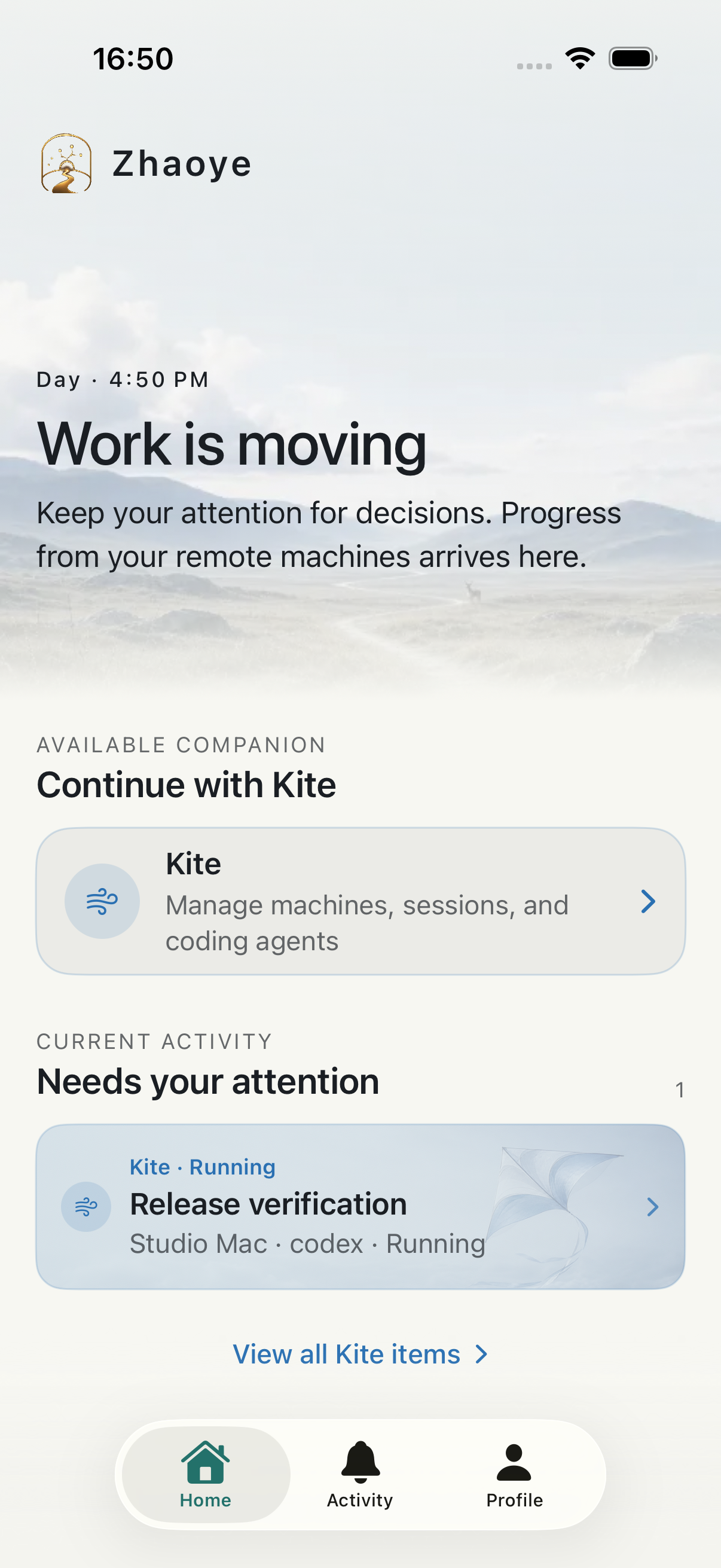
Home brings together the Kite entry point, online machines, running sessions, and pending matters. Assess what needs attention before entering the work.
IPHONE SIMULATOR · REAL APP UI · SAFE DEMO DATA
English Zhaoye home on iPhone Simulator showing Kite and a running remote session
02

Sessions and native terminal

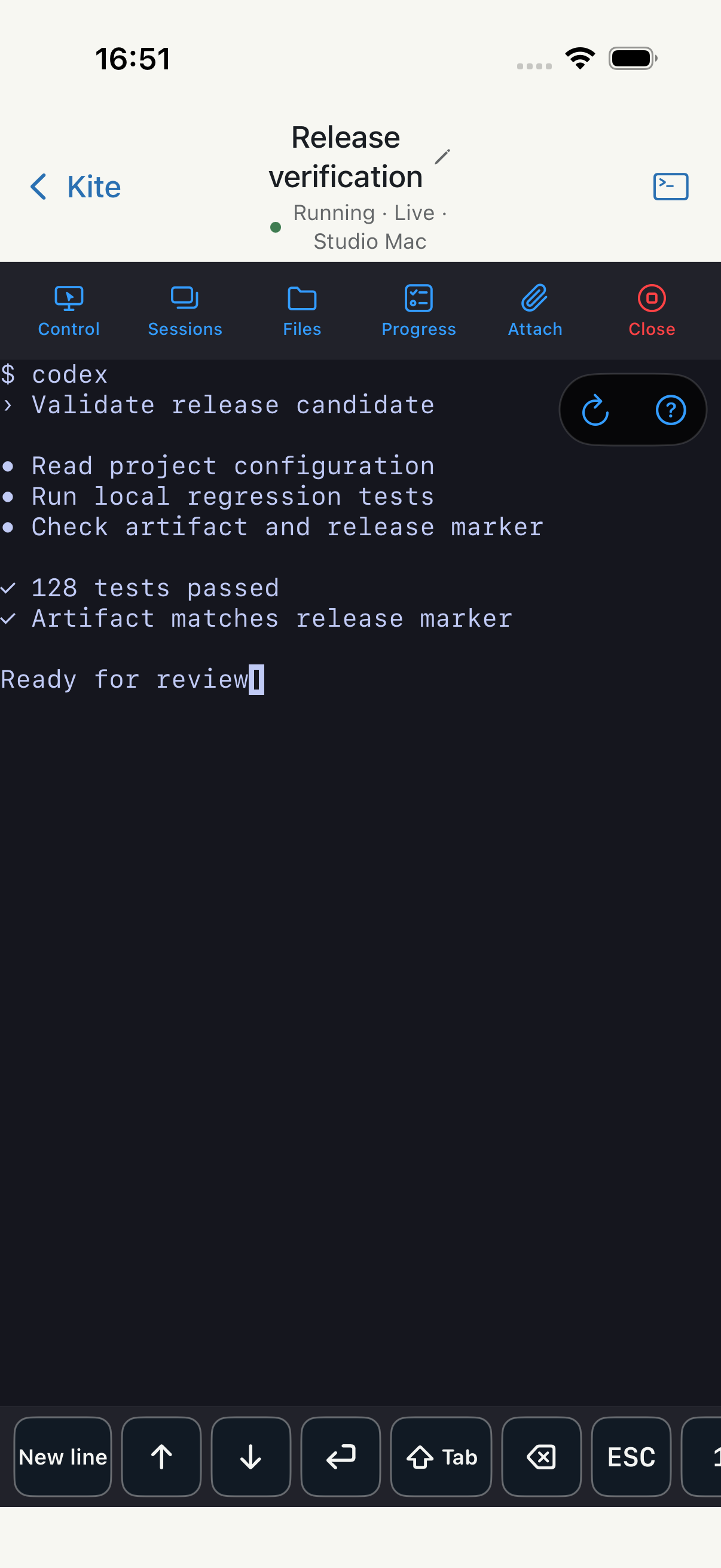
Open a coding-agent session and use its native TUI. Machine control, sessions, files, progress, and attachments remain in one context.
IPHONE SIMULATOR · REAL APP UI · SAFE DEMO DATA
English Zhaoye remote terminal on iPhone Simulator with live state and session controls
03

Screenshots, files, and attachments

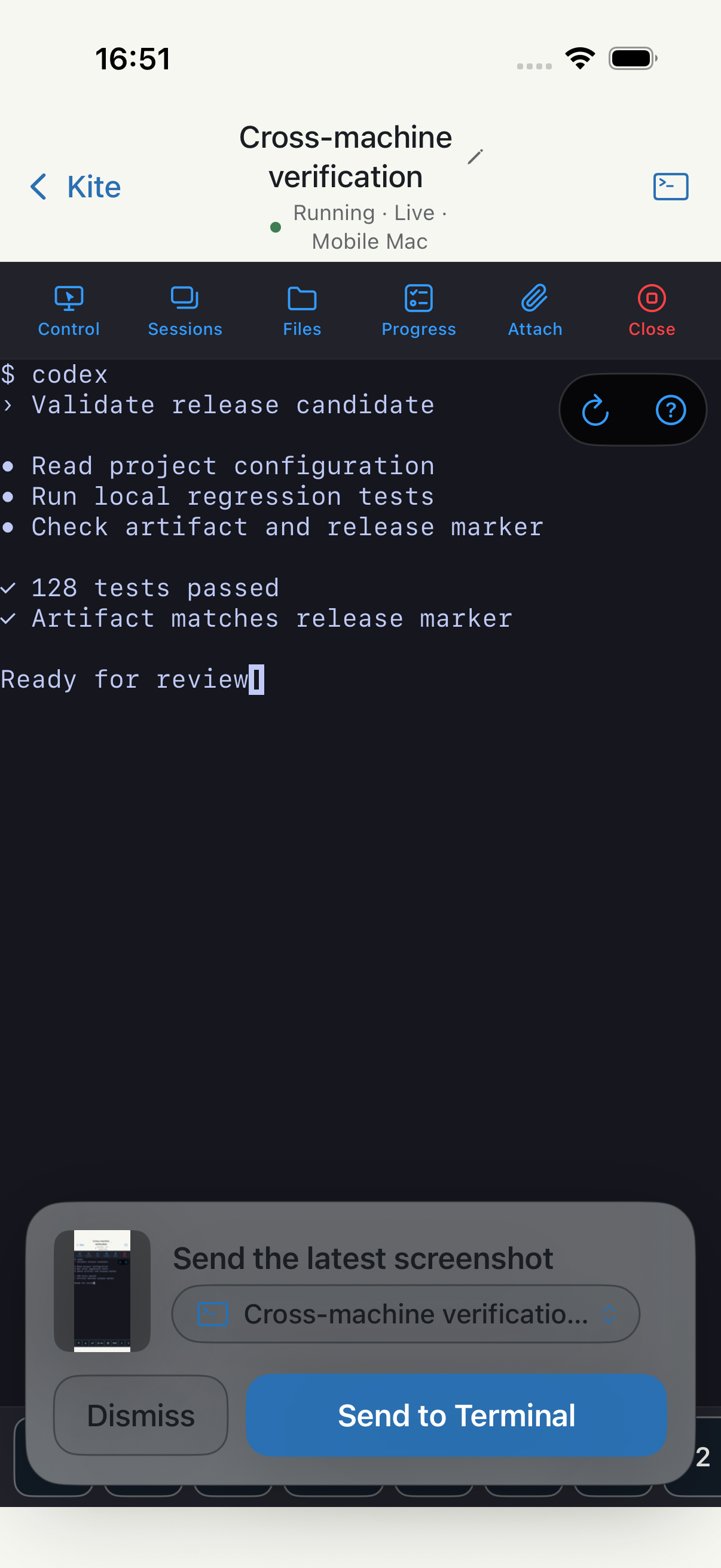
A screenshot is sent only after explicit confirmation. You can also choose an image or file, browse the workspace, and save an artifact.
IPHONE SIMULATOR · REAL APP UI · SAFE DEMO DATA
English Zhaoye screenshot attachment confirmation on iPhone Simulator
04

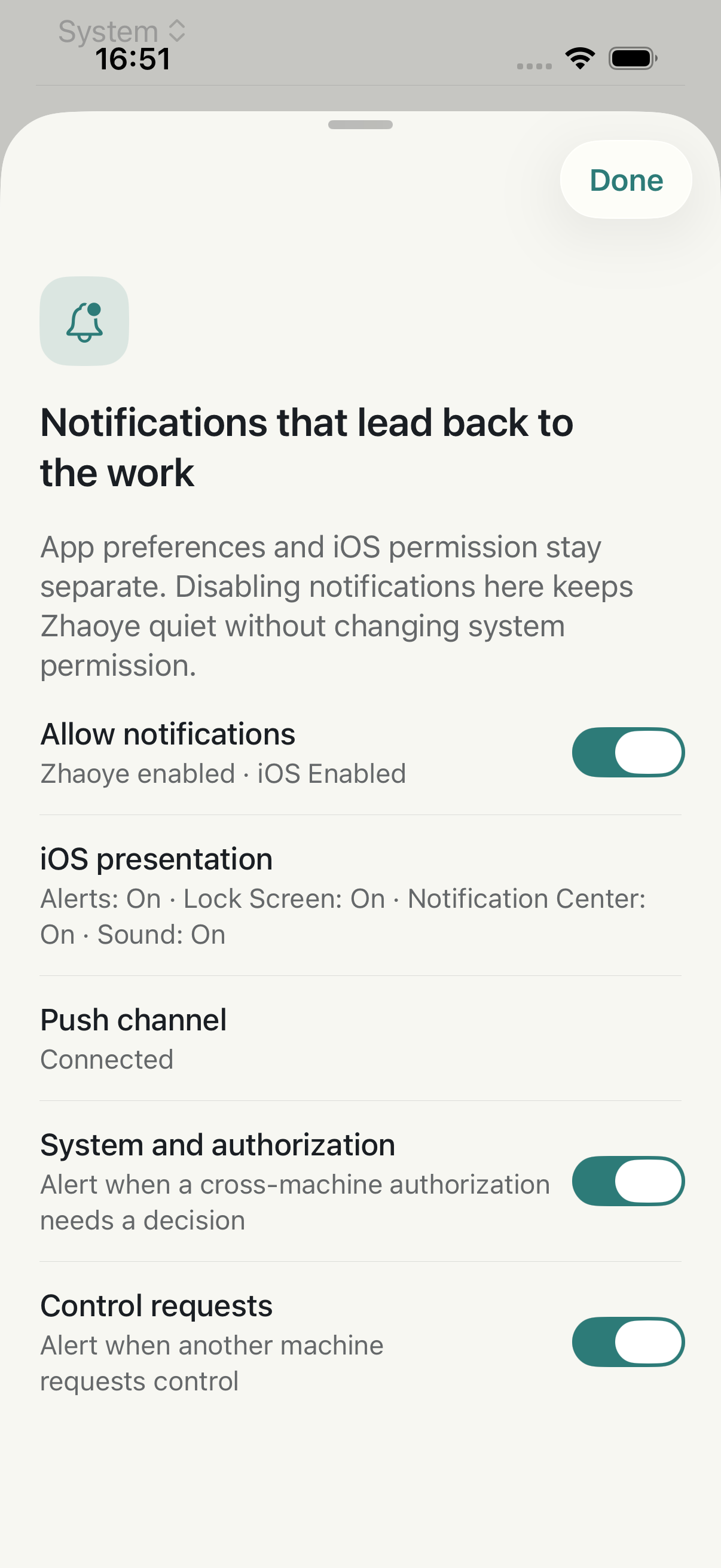
Notification control and task routing

Review the app switch, iOS presentation permission, and push-channel state together. Authorization, control, and task events remain independently manageable.
IPHONE SIMULATOR · REAL APP UI · SAFE DEMO DATA
English Zhaoye notification settings on iPhone Simulator showing app, iOS, and push state
05

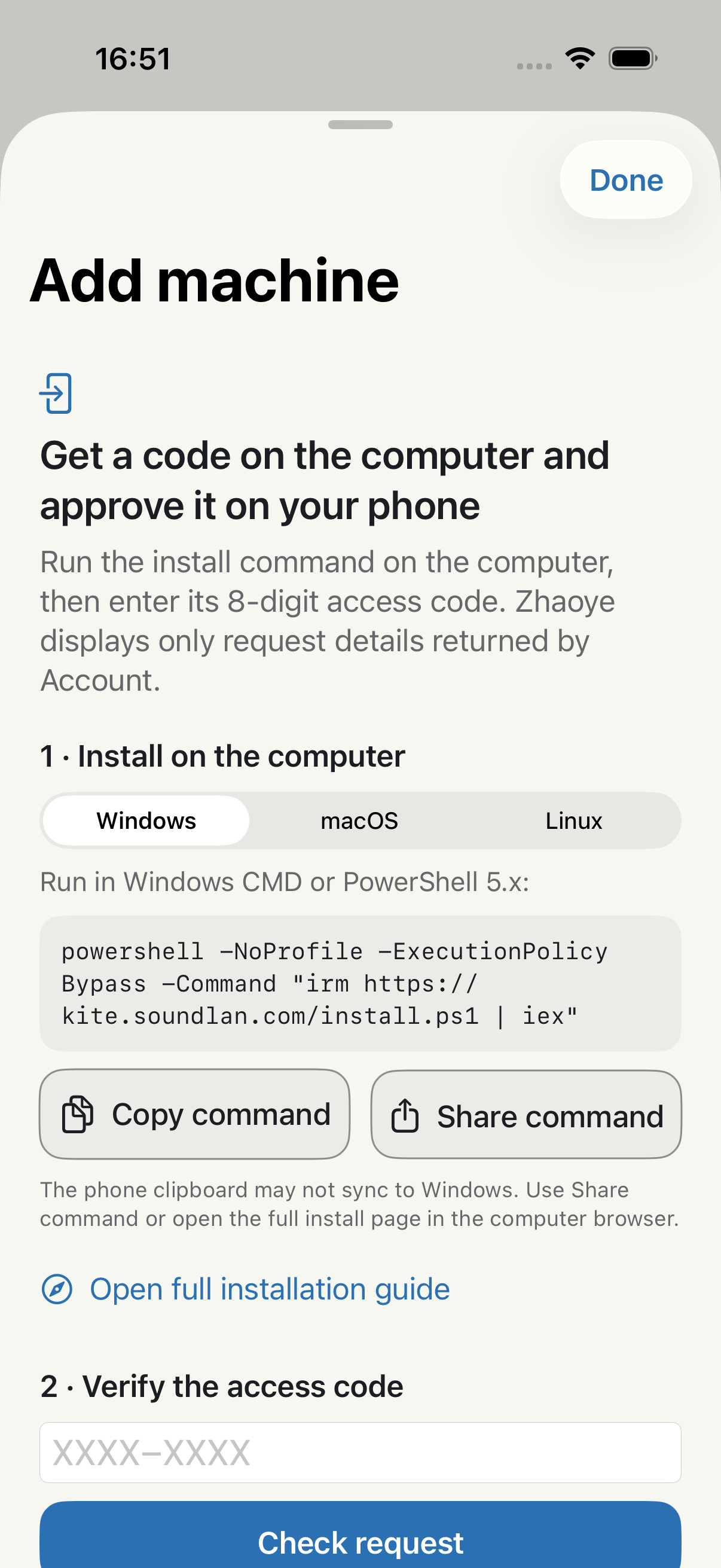
Secure computer onboarding

Run the installer on Windows, macOS, or Linux, then verify a one-time code on the phone. The flow explains access scope and later removal.
IPHONE SIMULATOR · REAL APP UI · SAFE DEMO DATA
English Zhaoye computer-onboarding flow on iPhone Simulator with installer command and one-time code
Core capabilities

Five remote workflows carried onto mobile

Status overviewReview machines, agents, sessions, and pending matters together, then decide whether intervention is needed.
Native terminalEnter a coding agent’s native TUI to continue input and review execution results from the phone.
File handlingBrowse an authorized workspace, preview artifacts, and save or share them through system controls.
Shared machinesAccept machine access from a collaborator and continue within the same project and session context.
Session archiveReview completed sessions and their output while retaining context for later analysis.

Vendor-neutral — claude · codex · opencode under one roof.

Membership

Your tier and usable limits stay visible

Zhaoye is free to download. Kite membership belongs to the same Lumenlan account and is shared by web and mobile, so there is no second purchase. The app shows tier, subscription state, current use, and plan limits together.

Membership tierFree / Pro / MaxYour current tier and subscription state appear at the top of Profile.
Connected machinesCurrent count / plan limitSee how many more machines you can connect. Before sync completes, the app says “Syncing” instead of showing a misleading 0 / 0.
Running sessionsCurrent count / concurrency limitKnow whether you can start another coding-agent session at the same time.
Monthly trafficUsed / total / remainingSee usage in the current billing period. Exact limits follow the current plan shown in the app.
Cross-device consistencyOne Lumenlan accountWeb and mobile read the same membership entitlement, avoiding duplicate purchase and conflicting product limits.

Plan price and billing period appear only in the in-app purchase flow for the current storefront; this page does not use cross-region price screenshots. While an entitlement is synchronizing, the app shows that state instead of an unexplained 0 / 0.

One entrance, one ecosystem

Zhaoye is the pocket entrance to the Lumenlan ecosystem

Lumenlan products cooperate on one thing — carrying your idea all the way to delivery. Zhaoye centers on the Kite console and uses the shared Lumenlan account.

IdeasLumi
ProjectsRobin
Decisions & contextDeerlight
ExecutionLumenlan Kite

For currently available features and entry points, see the Lumenlan website and each product page.

Mobile product boundary

Designed for response and continuation

Complex orchestration and continuous monitoring remain on the desktop console. Zhaoye focuses on status review, key decisions, terminal continuation, and machine authorization away from the desk.
Desktop console kiteapp.lumenlan.com →
FAQ

Things you may ask

Is it paid separately?
The app is free. Kite membership follows your Lumenlan account — phone and web share the same entitlements.
Which devices are supported?
The download page shows the currently supported Android and iPhone versions and the available installation options.
Does it sync with the web version?
Fully. One Lumenlan account, one fleet — machines added on the web appear on the phone at sign-in, and commands sent from the phone show up on the desktop.
What if notifications do not arrive?
Android vendors differ in push policy; the in-app notification settings include per-vendor guides. While the app is in the foreground it does not rely on system push at all.
The download will not open in WeChat
WeChat blocks app downloads. Tap “···” in the top-right corner and choose “Open in browser” to continue.

Your fleet, in the palm of your hand